With the Grow plan your site can go live on your own domain, yourbusiness.com or yourbusiness.es, instead of on yourbusiness.wiweb.me. The security certificate (the padlock, https) is included and renews by itself. Your .wiweb.me address keeps working.
You buy the domain yourself, wherever you like — Dinahosting, Arsys, IONOS, GoDaddy… — and we connect it. That way it's always yours, even if one day you leave wiweb.
Connect it#
- Go to Settings › Domain. Under “Have your own domain?”, type your domain and press “Connect”. On Free you'll see “Upgrade to Grow”.
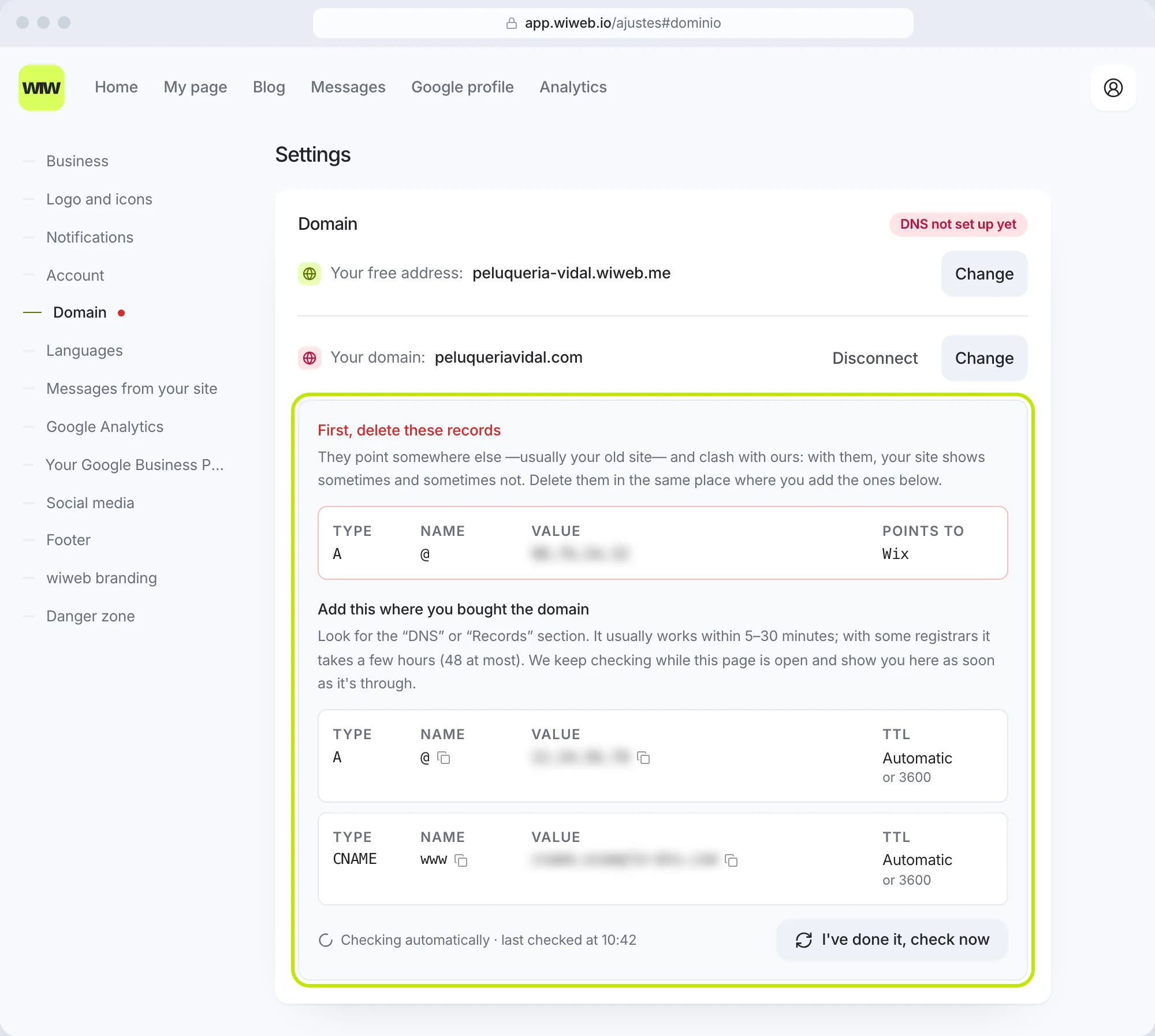
- We show you the records you need to add: “Add this where you bought the domain”.
- Go to the website where you bought the domain and look for the “DNS” or “Records” section. Add the records exactly as they are (the table below).
- Go back to Settings and press “I've done it, check now”. You don't need to sit and watch: while you have the page open, the card keeps checking by itself, with no time limit, and tells you when it last looked (“Checking automatically · last checked at 10:42”). With the page closed, we check it ourselves and email you when it works. If it still isn't working after 48 hours, we email you too, with the records that are missing.
- When the status says “Working”, publish on your domain: in My page, “Publish” › your domain's row.
The DNS records#
For a domain like yourbusiness.com there are two records. Settings › Domain gives you the exact values, with a button to copy the name and the value: copy them from there, not from this page.
| Type | Name | Value | TTL |
|---|---|---|---|
A |
@ |
an IP: 76.76.•••.•• |
Automatic (or 3600) |
CNAME |
www |
an address: cname.•••••••.com |
Automatic (or 3600) |
@ means “the bare domain” (yourbusiness.com) and www, its www version. We set up the www version ourselves, and it sends people to the version without www: whether they type www.yourbusiness.com or yourbusiness.com, they reach your site, both with the padlock. If you connect a subdomain, such as web.yourbusiness.com, it's a single record: a CNAME named web. Some providers call the “Name” field “Host” or “Subdomain”, and the “Value” “Points to” or “Target”.
If there were already records on
@orwwwpointing somewhere else (your old website, a “parked domain” page), the card shows them at the top, under “First, delete these records”, and “Points to” tells you where they go if we recognise it (for example Framer or Wix: your old site). Delete them: with them, your site shows sometimes and sometimes not. If we know where your DNS is managed, we tell you that too: “Your DNS is managed at …”.
How long it takes#
It usually works within 5–30 minutes; with some registrars it takes a few hours (48 at most). Until it works, the records stay on show in the card. At the top, the status tells you where it's up to:
| Status | What it means |
|---|---|
| Not connected | You haven't typed your domain yet |
| DNS not set up yet | We can't see the records yet. Add them or wait a little |
| Checking… | We've set it up and are waiting for it to be verified. Leave the records as they are |
| Preparing https… | Your domain already points to us (“Your domain already points to wiweb”) and we're preparing its security certificate. It takes a few minutes and you don't need to do anything |
| Working | Done: your domain takes people to your site, and it already opens with https |
| Having problems | We couldn't connect it because of something on our side. Press the support address on the card: an email opens already written with your domain, and we sort it out |
If you see “The domain already points here, but you haven't published your site on it yet”, the last step is missing: press “Publish”.
Until it works, you'll see a red dot on your account menu: “Your domain doesn't point to your site yet”.
If it doesn't work#
- Check that the type, the name and the value are exactly the ones in Settings, with no extra spaces or dots.
- Delete the records the card shows under “First, delete these records”, and any other record on
@orwwwthat points somewhere else. - Give it time — with some registrars, a few hours — and press “I've done it, check now”.
- If nothing changes, write to us at soporte@wiweb.io with your domain and the name of where you bought it. We'll sort it out with you.
Change or disconnect it#
To use a different domain, press “Change” on your domain's row: “Change your domain”, type the new one and press “Update”. The current one stops showing your site as soon as the new one works.
To remove it, on the same card, “Disconnect”. Your site stays on yourbusiness.wiweb.me.